Pinterest, pinterest, pinterest! That's all it seems my on and offline friends are talking about these days--and for good reason. This virtual corkboard that allows you to "pin" and share your online inspiration can help make life easier, craftier, and from what we can see, much more delicious.
But as much as I love Pinterest, the site at first look a little overwhelming for newbies (like, "oh no--one more thing to learn?") but the truth is, it's super easy. So I've put together five tips to help you get started. Happy Pinning!
1. Get an account
Pinterest is still invitation-only, so in order for you to start pinning, you need to score an invite. Don't panic; millions have one. So either request one on site, or I got an invitation by asking a friend of mine who was already an avid user. There's a good chance that one of your Facebook friends is on the site and might be able to send you one pretty easily.
Tip: When you create your user name, I suggest matching it as closely as possible to your other social media monikers so it's easy for people to find you--or if you're like me, easier for you to remember! "Pinner647892" is probably not the best choice.
2. Create your Pinterest boards
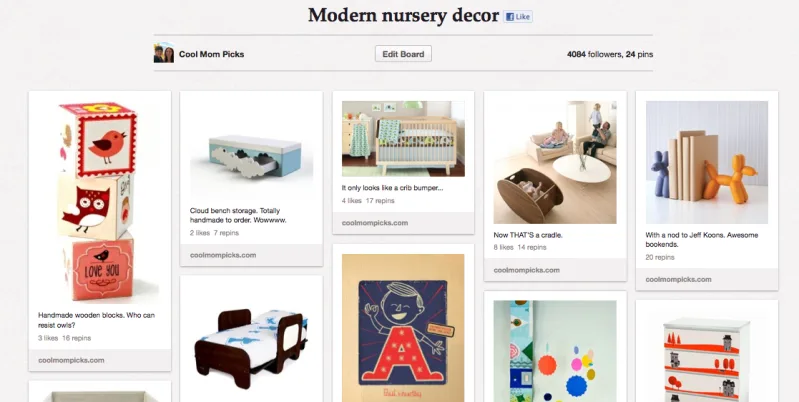
Once you're logged in and you've created your basic bio, you should start creating boards. Think about what types of items you'll be pinning, whether you're looking for nursery inspiration, healthy recipes, or cool hairstyles. People have boards based on all sorts of categories, from colors to holidays, special occasions like weddings or showers, to almost everything in between. Our own boards are as broad as Food (Nom Nom Nom) and Crafty Picks for DIYers, to more specific topics like first birthday gifts or lunchboxes for back to school time.
Some people have themes like "If I had a million dollars" or "things that make me laugh." It all comes down to what you're interested in.
Tip: If you're not sure what you're looking for just yet, take a spin around the site first and let your boards be inspired by what you see.
3. Find people to follow
Now that you've got your boards created, you can start to find cool people to follow. I looked for my favorite bloggers, particularly the ones that inspire me, whether it's because of their amazing design sensibilities, their yummy recipes, or their adorable crafts. I also like to see who they're following too for suggestions. And of course you can search by about 30 categories, like architecture, humor, kids, or technology.
Some of our favorite pinners include Jaime Derringer from Design Milk, Joy Cho from Oh Joy!, design blogger Jordan Ferney, and Isabel Kallman's AlphaMom It's also fun following Ben Silberman, one of the Pinterest founders, who happens to have a great board on gifts for guy friends. (Something a little lacking on Pinterest, as you may notice.)
Once you've found them--connect! You can comment on their pins, like them, or repin them yourself to your own boards.
Tip: Keep in mind that you don't have to follow all of one person's boards. If you click "follow" under their profile you will follow every board. Or you can choose to follow just one (or a few) of their individual boards. This can keep your feed from being completely overwhelmed by the power-pinners.
4. Start pinning
Let the fun begin! Add the bookmarklet to your browser (via your account) so that you can easily pin anything you find on your daily jaunts around the web. It's crazy easy--you click a "pin it" button when you see something you like...say, on Cool Mom Picks? And the pop-up window will prompt you for the rest.
You can also use the Pinterest iPhone app if you're pinning on the go. When you pin, you can just pin the visual or add a comment.
Tip: Beautiful visuals are more apt to get repinned. So if you're looking for your own picks to catch on, consider how the photography looks.
5. Like, repin, and comment!
This is a social network, meaning connections are key--and a fun way to meet new people and become part of the community. Aside from finding your own inspirations to pin, you can also acknowledge other pins on that you like.
When you "like" a pin, it's similar to liking something on Facebook or Instagram, which is also how commenting works. Your likes and comments will show up on your main page, the same as they do on Facebook. Or you can repin an image, which means you're actually putting it into one one of your own boards.
Tip: It's really important to credit to the original sources of your pins. REALLY important. If you repin, that credit will happen automatically, but if you go back to the original source (say, a shop or a blog) to pin, it's nice to credit the pinner who first sent you there with an with an @. Pinterest's values include integrity and community and they really like to see credit given where it's due.
Do you have any more tips for getting started on Pinterest? Leave your tips--and your pinterest handles in comments. And come find us too! We've got boards for both Cool Mom Picks and Cool Mom Tech which we hope you'll love.
But as much as I love Pinterest, the site at first look a little overwhelming for newbies (like, "oh no--one more thing to learn?") but the truth is, it's super easy. So I've put together five tips to help you get started. Happy Pinning!
1. Get an account
Pinterest is still invitation-only, so in order for you to start pinning, you need to score an invite. Don't panic; millions have one. So either request one on site, or I got an invitation by asking a friend of mine who was already an avid user. There's a good chance that one of your Facebook friends is on the site and might be able to send you one pretty easily.
Tip: When you create your user name, I suggest matching it as closely as possible to your other social media monikers so it's easy for people to find you--or if you're like me, easier for you to remember! "Pinner647892" is probably not the best choice.
2. Create your Pinterest boards
Once you're logged in and you've created your basic bio, you should start creating boards. Think about what types of items you'll be pinning, whether you're looking for nursery inspiration, healthy recipes, or cool hairstyles. People have boards based on all sorts of categories, from colors to holidays, special occasions like weddings or showers, to almost everything in between. Our own boards are as broad as Food (Nom Nom Nom) and Crafty Picks for DIYers, to more specific topics like first birthday gifts or lunchboxes for back to school time.
Some people have themes like "If I had a million dollars" or "things that make me laugh." It all comes down to what you're interested in.
Tip: If you're not sure what you're looking for just yet, take a spin around the site first and let your boards be inspired by what you see.
3. Find people to follow
Now that you've got your boards created, you can start to find cool people to follow. I looked for my favorite bloggers, particularly the ones that inspire me, whether it's because of their amazing design sensibilities, their yummy recipes, or their adorable crafts. I also like to see who they're following too for suggestions. And of course you can search by about 30 categories, like architecture, humor, kids, or technology.
Some of our favorite pinners include Jaime Derringer from Design Milk, Joy Cho from Oh Joy!, design blogger Jordan Ferney, and Isabel Kallman's AlphaMom It's also fun following Ben Silberman, one of the Pinterest founders, who happens to have a great board on gifts for guy friends. (Something a little lacking on Pinterest, as you may notice.)
Once you've found them--connect! You can comment on their pins, like them, or repin them yourself to your own boards.
Tip: Keep in mind that you don't have to follow all of one person's boards. If you click "follow" under their profile you will follow every board. Or you can choose to follow just one (or a few) of their individual boards. This can keep your feed from being completely overwhelmed by the power-pinners.
4. Start pinning
Let the fun begin! Add the bookmarklet to your browser (via your account) so that you can easily pin anything you find on your daily jaunts around the web. It's crazy easy--you click a "pin it" button when you see something you like...say, on Cool Mom Picks? And the pop-up window will prompt you for the rest.
You can also use the Pinterest iPhone app if you're pinning on the go. When you pin, you can just pin the visual or add a comment.
Tip: Beautiful visuals are more apt to get repinned. So if you're looking for your own picks to catch on, consider how the photography looks.
5. Like, repin, and comment!
This is a social network, meaning connections are key--and a fun way to meet new people and become part of the community. Aside from finding your own inspirations to pin, you can also acknowledge other pins on that you like.
When you "like" a pin, it's similar to liking something on Facebook or Instagram, which is also how commenting works. Your likes and comments will show up on your main page, the same as they do on Facebook. Or you can repin an image, which means you're actually putting it into one one of your own boards.
Tip: It's really important to credit to the original sources of your pins. REALLY important. If you repin, that credit will happen automatically, but if you go back to the original source (say, a shop or a blog) to pin, it's nice to credit the pinner who first sent you there with an with an @. Pinterest's values include integrity and community and they really like to see credit given where it's due.
Do you have any more tips for getting started on Pinterest? Leave your tips--and your pinterest handles in comments. And come find us too! We've got boards for both Cool Mom Picks and Cool Mom Tech which we hope you'll love.